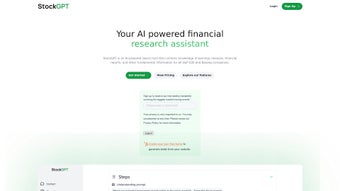

Download StockGPT – AI‑Powered Tesla Earnings Call Search Tool
Introduction to StockGPT
StockGPT is an innovative, AI‑driven web application created especially for investors, financial analysts, and anyone who follows Tesla’s market performance. By connecting to a comprehensive archive of Tesla’s quarterly earnings‑call transcripts dating back to the second quarter of 2011, the platform enables users to retrieve precise information about stock movements, revenue trends, production milestones, and strategic guidance with just a few keystrokes. The AI engine interprets natural‑language queries, matches them against the full text of each transcript, and surfaces the most relevant excerpts, dramatically reducing the time traditionally spent scrolling through PDFs or SEC filings.
While the service is currently in an experimental phase—meaning the AI can sometimes generate statements that are slightly off‑topic or require verification—it still provides a valuable shortcut for anyone looking to understand Tesla’s financial narrative quickly. Users are encouraged to treat the output as a research starting point and cross‑check critical figures against official sources. StockGPT also supplies a library of sample queries to help newcomers discover the breadth of its capabilities, and an active Discord community offers real‑time assistance, sharing tips, custom prompts, and update alerts.
In essence, StockGPT blends large‑language‑model power with a focused financial dataset, delivering a specialized search experience that can boost the efficiency of stock research for one of the world’s most watched companies.
Key Features and Benefits
- Extensive Transcript Archive: Access every Tesla earnings‑call transcript from Q2 2011 onward, all neatly indexed for instant retrieval.
- AI‑Powered Natural Language Search: Type questions like “What did Elon Musk say about battery costs in Q4 2022?” and receive precise excerpts without scrolling through pages of text.
- Keyword Highlighting: The interface highlights searched terms within the returned transcript sections, making it easy to spot context.
- Downloadable Snippets: Export relevant transcript excerpts as PDF or plain text for offline analysis or inclusion in research reports.
- Example Queries Library: A curated list of sample prompts demonstrates how to get the most out of the AI, reducing the learning curve for new users.
- Community Support via Discord: A vibrant Discord server provides peer‑to‑peer help, sharing tips, custom prompts, and alerts about updates.
- Secure, Browser‑Based Access: No software installation required; all processing occurs within the secure confines of the web app, minimizing exposure to malware.
- Free Tier with Optional Premium Enhancements: The core search functionality is free, while advanced features like batch export and priority AI processing are offered under a modest subscription.
Each of these capabilities works together to turn StockGPT into a time‑saving powerhouse for anyone tracking Tesla’s earnings narrative. The AI’s contextual awareness—distinguishing between “vehicle deliveries” and “energy‑storage shipments,” for example—helps reduce the misinterpretation that often occurs when reading dense earnings‑call scripts. The downloadable snippet feature lets analysts keep a clean audit trail of the exact wording used by Tesla’s executives, a critical element when preparing investor presentations or compliance reports.
Meanwhile, the keyword‑highlighting function ensures that even long excerpts remain scannable, allowing users to zero in on the precise figures or statements they need. The free tier is generous enough for casual investors to explore the platform without any financial commitment, while the premium tier adds workflow‑enhancing tools such as batch export of multiple excerpts and priority processing during high‑traffic periods. Although the experimental nature of the AI means users should verify any crucial numbers, the speed, convenience, and depth of data provided make StockGPT an indispensable addition to any Tesla‑focused research toolkit.
Installation, Usage Guide & Compatibility
Getting Started – No Installation Required
StockGPT operates entirely as a web‑based service, so there is no traditional installation process. To begin, simply navigate to the official StockGPT URL using any modern browser (Chrome, Firefox, Edge, Safari). The homepage greets you with a clean search bar and a “Try Demo” button that showcases sample queries. For first‑time users, we recommend clicking “Try Demo” to explore the AI’s response style before entering your own questions. Because everything runs in the browser, there are no downloads, no admin rights needed, and no lingering files on your hard drive.
Step‑by‑Step Usage
- Create a Free Account: While basic searches are available anonymously, registering unlocks history tracking, export options, and higher query limits. The sign‑up process takes less than a minute and only requires an email address and a password.
- Enter Your Query: Type a natural‑language question in the search bar. For best results, be specific (e.g., “What were Tesla’s gross margins in Q1 2023?”). The AI parses the request, identifies relevant quarters, speakers, and topics, and returns the most appropriate excerpts.
- Review AI Response: The platform displays one or more transcript excerpts, each labeled with the date, quarter, and speaker name. Highlighted keywords show exactly where your terms appear, and a confidence score indicates how closely the excerpt matches your query.
- Export or Save: Use the “Download” button to save the excerpt as a PDF, or click the “Copy” icon to paste the text directly into spreadsheets, note‑taking apps, or research reports. Exported files retain the original formatting, making them ready for professional presentation.
- Iterate and Refine: If the answer isn’t precise enough, edit your query by adding qualifiers like “Elon Musk,” “financial outlook,” or a specific metric such as “vehicle delivery numbers.” Each refinement helps the AI narrow its focus, delivering increasingly accurate results.
System Compatibility
Because StockGPT runs in the browser, it is compatible with virtually any operating system that supports modern web standards. This includes Windows 10/11, macOS Ventura and later, Linux distributions with up‑to‑date browsers, as well as mobile platforms such as Android 13 and iOS 17. For optimal performance, we recommend using the latest version of Chrome, Firefox, or Safari, and ensuring that JavaScript is enabled. The platform is fully responsive, adapting its layout for tablets and smartphones without loss of functionality.
While the core service is free, users who need higher query limits or priority processing can upgrade to a premium subscription. Payment is handled securely via Stripe, and the subscription can be cancelled at any time from the account dashboard. Throughout the process, all data transmission is encrypted with HTTPS, and no personal information is stored beyond what is necessary for account management. Users also benefit from regular updates; the development team releases weekly improvements to the AI model, adds new transcript data shortly after each earnings call, and refines the UI based on community feedback, ensuring that the tool remains both current and reliable.
Pros, Cons, Frequently Asked Questions & Final Verdict
Pros
- Instant access to over a decade of Tesla earnings‑call transcripts.
- Natural‑language AI search eliminates manual scrolling and keyword hunting.
- Free tier provides robust functionality for casual investors.
- Cross‑platform compatibility—no installation, works on Windows, macOS, Linux, Android, iOS.
- Export options streamline research workflow.
- Active Discord community for peer support and tips.
- Secure, HTTPS‑encrypted communication protects user data.
- Weekly AI model updates keep the search results current.
Cons
- Experimental AI may occasionally generate inaccurate or out‑of‑context answers.
- Limited to Tesla data—cannot search other companies without a separate tool.
- Premium features (batch export, higher query limits) require a paid subscription.
- No built‑in financial modeling or charting capabilities; users must pair it with other analysis tools.
- Reliance on an internet connection; offline access is not currently supported.
FAQ – StockGPT (FAQPage)
Is StockGPT really free to use?
Yes, the basic search functionality is completely free. A paid subscription is optional and only needed for higher query limits, batch export, and priority AI processing.
How accurate is the AI’s response?
StockGPT’s AI is trained on a curated set of Tesla earnings‑call transcripts, but because it is still experimental, occasional inaccuracies can occur. Users should always verify critical figures against official SEC filings or trusted financial sources.
Do I need to install any software?
No. StockGPT runs entirely in the web browser, so there is nothing to download or install. It works on any device with a modern browser.
Can I search for other companies besides Tesla?
Currently, StockGPT is focused exclusively on Tesla’s earnings‑call transcripts. The team may expand to additional companies in future updates, but for now the dataset is Tesla‑only.
Is my data safe when I use StockGPT?
All communications between your browser and StockGPT’s servers are encrypted via HTTPS. The platform does not store personal query data beyond what is needed for account management, and it adheres to standard privacy practices.
Conclusion & Call to Action
StockGPT represents a compelling blend of AI convenience and deep, Tesla‑specific data. For investors who regularly monitor Tesla’s quarterly performance, the platform can shave hours off the research process, delivering pinpointed transcript excerpts at the click of a button. While the experimental nature of the AI means users must remain vigilant about verification, the free tier’s generous capabilities make it an attractive first‑stop for both novices and seasoned analysts. If you’re looking to streamline your Tesla earnings research, download StockGPT today, create a free account, and explore the sample queries to see how much time you can save.



.png)



